
Google Analytics: metriche basilari e report



Hai un sito web oppure uno shop online, magari creato con Jimdo, e hai già effettuato il collegamento con Google Analytics? Se hai impostato tutto e aspettato un paio di giorni o settimane per vedere apparire i primi dati, ora è arrivato il momento di imparare quali sono le metriche e i report che dovresti monitorare.
Google Analytics può apparire complicato alle persone che lo usano per la prima volta, ma il valore delle informazioni che puoi ottenere da questo strumento ricompensa qualsiasi fatica. Vale la pena di dedicare del tempo per capire come funziona e, in questo articolo, ti guiderò passo dopo passo. Ecco alcuni degli argomenti di cui parlerò e che ti aiuteranno a comprendere come funziona l’analisi del traffico verso il tuo sito:
- Metriche basilari in GA
- Panoramica delle performance del sito (Pubblico)
- Report sulle fonti del traffico (Acquisizione)
- Analisi del comportamento di chi visita il sito (Comportamento)
1. Metriche basilari in Google Analytics
Prima di iniziare, crea un account Google Analytics e collegalo al tuo sito. Ci vorrà un po’ di tempo prima che inizino ad apparire i dati: può trattarsi di giorni o settimane, a seconda
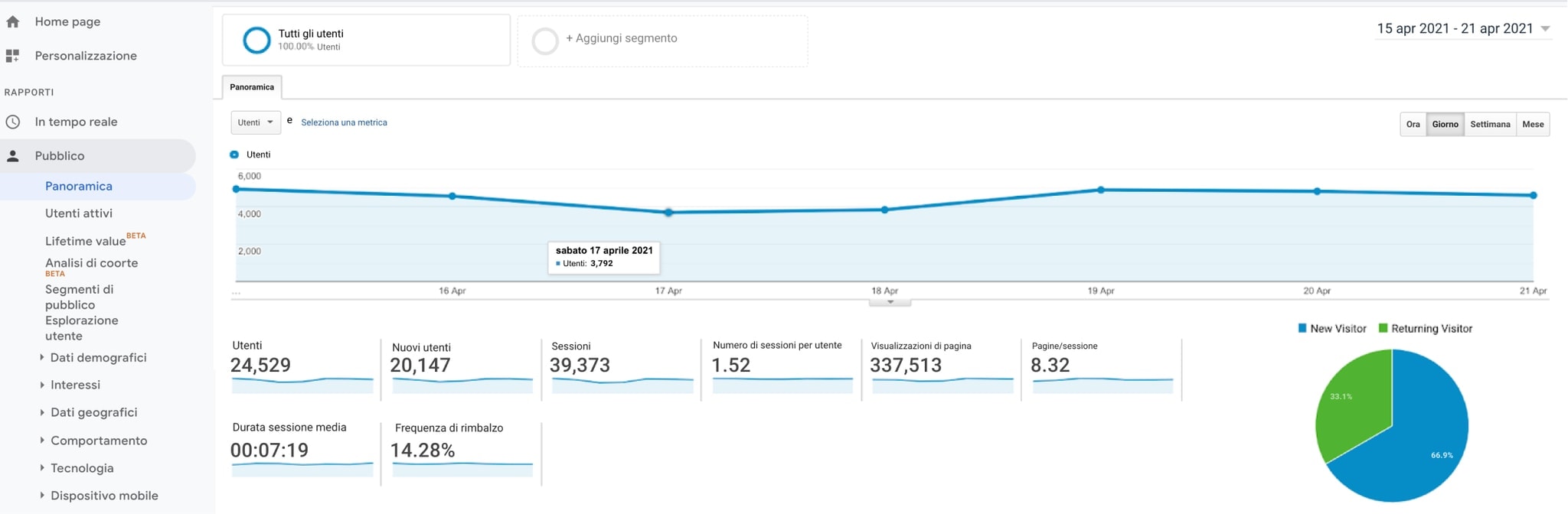
Le metriche più importanti di cui bisogna tenere conto sono sessioni, utenti, nuovi/e utenti, visualizzazioni di pagina, numero di pagine per sessione, durata sessione media, frequenza di rimbalzo. Esistono anche altre metriche che potrai aggiungere o monitorare nel futuro, ma per il momento, ti suggerisco di iniziare da queste.
Ma qual è il significato di ciascuna metrica?
- Sessioni: per sessione si intende un gruppo di interazioni con il tuo sito web in un determinato arco di tempo. Una singola sessione può contenere più visualizzazioni di pagina, eventi, interazioni sociali e transazioni. Un singolo/una singola utente può aprire più sessioni. La sessione termina: 1) sulla base del tempo: dopo 30 minuti di inattività o dopo la mezzanotte 2) se l’utente lascia il sito e poi vi fa ritorno seguendo un percorso diverso
- Utenti: numero di visitatori/visitatrici che hanno almeno una sessione sul tuo sito. Questa metrica ti dice in modo più accurato quante persone hanno visitato il tuo sito.
- Visualizzazioni di pagina: il numero totale di pagine visitate. Partendo dal presupposto che tu abbia più pagine sul tuo sito, vorrai che questo numero sia più alto di quello delle sessioni.
- Pagine per sessione: il numero medio di pagine del tuo sito visitate durante una sessione. Avere più pagine per sessione significa che gli/le utenti stanno interagendo con il tuo sito e lo stanno esplorando.
- Durata sessione media: il tempo di durata medio delle sessioni. Ancora una volta, più questo dato è alto, più i visitatori/le visitatrici stanno interagendo con il tuo sito.
- Frequenza di rimbalzo: percentuale delle visite che si limitano a una sola pagina (es.: persone che entrano nel sito e lo abbandonano senza esplorarlo). Di solito una percentuale alta indica che le persone abbandonano il sito o una determinata pagina, perché non hanno trovato quello che stavano cercando.
- Percentuale di nuove sessioni: media del numero di visitatori/visitatrici che arrivano per la prima volta sul tuo sito. Idealmente il traffico verso un sito dovrebbe essere composto da un mix di utenti nuovi/e “vecchi/e” (utenti che ritornano).
Fortunatamente, Google Analytics include quasi tutte queste metriche nella sezione “Panoramica” di cui parleremo nel punto successivo.
2. Panoramica delle performance del sito (Pubblico)
Il modo migliore per monitorare il successo del tuo sito è quello di comparare i livelli di traffico nel tempo. Più tempo passerà, più dati raccoglierai, più sarai in grado di confrontarli di mese in mese, di quadrimestre in quadrimestre, di anno in anno. Ora ti spiegherò come trovare la sezione “Panoramica” (la quale mostra le metriche spiegate nel primo punto dell’articolo) e come comparare i dati nel tempo:
Come accedere al report Pubblico?
1. Entra nel tuo account Google Analytics
2. In alto a sinistra seleziona dal menu la voce “Tutti i dati del sito web”
3. Clicca sulla voce “Pubblico” che compare nel menu laterale a sinistra
4. Clicca poi su “Panoramica”
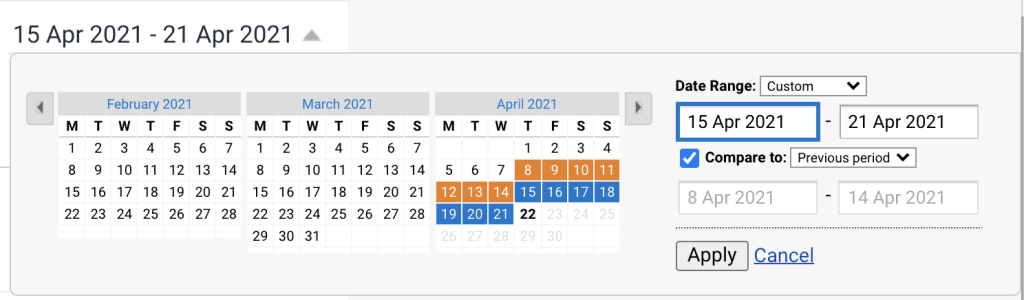
5. Appariranno le metriche base e in alto a destra vedrai il lasso di tempo preso in considerazione. Per cambiarlo basta cliccarci sopra e selezionare il periodo che ti interessa.
6. Clicca su “Confronta con” e seleziona il periodo precedente che ti interessa.
7. Clicca su “Applica”
Andamento e interpretazione delle metriche basilari
È bene controllare con regolarità le metriche mostrate all’interno di questa sezione perché danno molte informazioni sul grado di interazione dei visitatori/delle visitatrici con il tuo sito. Il tuo obiettivo sarà sicuramente quello di veder crescere nel tempo i dati relativi a sessioni, utenti e visualizzazioni delle pagine. Inoltre vorrai che la maggior parte dei visitatori/delle visitatrici vada su più di una pagina durante la stessa sessione, specialmente nel caso in cui tu stia arricchendo il sito di sempre più pagine. L’aumentare del tempo speso per singola sessione inoltre ti farà capire che gli/le utenti trovano interessanti i tuoi contenuti. Una crescita della percentuale di nuove sessioni o nuovi/e utenti sarà anch’essa auspicabile perché indicherà che il traffico verso il sito è composto non solo da “vecchi” visitatori, ma anche da nuove persone.
L’unica metrica che è meglio rimanga bassa è la frequenza di rimbalzo. A seconda del settore in cui operi e del tuo sito web, questo dato non dovrebbe superare il 70-80%. Se accade il contrario, significa che chi visita il sito non è soddisfatto/a dei contenuti e allora dovrai fare apportare dei miglioramenti: magari migliorare il design o curare i testi del sito.
Altre metriche importanti nel report Pubblico
Ci sono altre metriche che è importante considerare per rispondere alla domanda: “Chi sono le persone che visitano il sito e quindi i miei/le mie potenziali clienti?”.
Questi dati possono essere utilizzati per creare un profilo persona del/la potenziale cliente, utile per raccogliere idee su nuovi prodotti da sviluppare (nel caso il sito sia uno shop online), sui contenuti di testo e visuali da inserire sul sito e sulla tipologia di ads (su Google, Facebook e altre piattaforme) su cui vogliamo investire per attirare ancora più traffico.
- Dati demografici: in questa sezione si trovano informazioni fondamentali relative all’età e al sesso delle persone che visitano il sito. La rilevazione di questi dati deve essere abilitata manualmente andando nel menu laterale a sinistra. Clicca sull’icona con l’ingranaggio, accedi al profilo amministratore, vai su “Impostazioni proprietà” e infine clicca su “Abilita rapporti demografici e interessi”.
- Interessi: in questa area vengono mostrate le aree di interesse dei visitatori/delle visitatrici. Anche queste informazioni sono utili per sviluppare idee per prodotti, contenuti del sito, ads e anche per individuare settori dove operano aziende con le quali eventualmente creare delle partnership per attrarre ancora più traffico verso il sito.
- Dati geografici: monitorando questa sezione, si hanno informazioni sulle lingue parlate dalle persone che visitano il sito e sulla città dalla quale si stanno collegando. Il dato relativo alle lingue può essere utile per decidere se sia opportuno trasformare il sito in un sito multilingua e per capire se i prodotti o i servizi venduti potrebbero avere successo anche su altri mercati oltre a quello principale. Il dato sulla provenienza è utile soprattutto per gli shop perché può essere adottato per decidere su quali partner di spedizione puntare, scegliendo quelli che hanno prezzi vantaggiosi per le destinazioni in cui risiedono il maggior numero di visitatori/visitatrici del sito.
- Utenti nuovi vs. di ritorno: questa area indica quanti/e utenti arrivano per la prima volta sul sito e quanti/e invece vi fanno ritorno. Se la percentuale degli/delle utenti di ritorno è molto bassa, si può lavorare per incrementarla, ad esempio inserendo nel sito un formulario per raccogliere gli indirizzi email dei visitatori/delle visitatrici e creando poi una mailing list attraverso la quale inviare dei contenuti che spingano le persone a ritornare sul sito o sullo shop. Se vuoi saperne di più su questo tema, puoi leggere il nostro articolo sull’email marketing.
- Dispositivo mobile: consultando questa sezione apprenderemo le percentuali di/delle utenti che arrivano e navigano sul sito usando il desktop, il tablet o un dispositivo mobile. Possiamo usare queste informazioni per ottimizzare il nostro sito tenendo conto del tipo di dispositivo che viene maggiormente utilizzato dai visitatori/dalle visitatrici. È forse lo smartphone? Leggi il nostro articolo su come adattare il sito alla visualizzazione su mobile.
3. Report sulle fonti del traffico (Acquisizione)
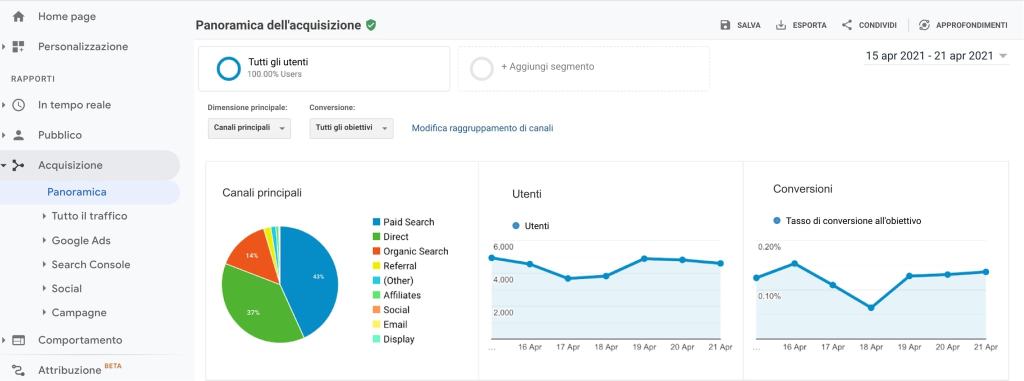
Un altro importante report da considerare è quello dell’Acquisizione che mostra i dati sulle fonti del traffico. Quali sono i più importanti?
- Traffico diretto: composto da visitatori/visitatrici che arrivano sul sito digitando l’URL nel browser o cliccando sull’indirizzo precedentemente memorizzato nel bookmark.
- Traffico organico: dato da visitatori/visitatrici che arrivano sul sito attraverso i motori di ricerca.
- Traffico referral: visitatori/visitatrici che arrivano sul sito attraverso un link presente su un altro sito.
- Traffico social: visitatori/visitatrici che arrivano sul tuo sito attraverso i social media.
Per visualizzare questi dati specifici, è necessario raggruppare i diversi canali dai quali proviene il traffico. Per sapere come fare, segui le indicazioni di questo articolo del supporto.
Come accedere al report Acquisizione?
1. Entra nel tuo account Google Analytics
2. In alto a sinistra seleziona dal menu la voce “Tutti i dati del sito web”
3. Nel menu laterale a sinistra, clicca sulla voce “Acquisizione”
4. Si aprirà la schermata panoramica che mostra il traffico proveniente dai vari canali
5. Vai in alto a destra per modificare il periodo di monitoraggio
6. Clicca su “Applica”
Andamento e interpretazione delle metriche sul traffico
Non esistono regole specifiche sulla quantità ideale di traffico che dovrebbe provenire da ciascun canale. Nel migliore dei casi si tratta di un mix di tutti i canali presenti.
Se vedi che il traffico è principalmente organico, quindi proveniente dai motori di ricerca, puoi fare delle ricerche per capire come migliorare le performance degli altri canali.
Per migliorare il traffico proveniente da referral ad esempio puoi porre in essere una strategia efficace di link building.
Se invece vuoi far crescere il traffico proveniente dai social, concentra i tuoi sforzi di marketing su questo canale, adottando anche in questo caso una specifica strategia social (ad es. condivisione di post adatti al profilo persona che hai delineato servendoti dei dati demografici presenti nel report Pubblico).
Se invece vuoi far crescere ancora il traffico che proviene dai motori di ricerca, dedicati ancora di più all’ottimizzazione SEO del sito.
4. Analisi del comportamento di chi visita il sito (Comportamento)
Le metriche contenute in questo report sulle quali mi soffermerò sono:
- Landing page (o pagine di destinazione): la landing page è una pagina attraverso la quale i visitatori/le visitatrici entrano nel tuo sito, quindi la prima pagina che viene visitata. È importante che le pagine siano ottimizzate in modo da invogliare le persone a rimanere sul sito e a navigare su altre pagine, in particolare su quelle in cui vogliamo venga compiuta un’azione: ad esempio compilare un formulario, acquistare dei prodotti e servizi e così via. Questa sezione del report Comportamento è molto utile perché ci fa capire se una data landing page funziona o meno. Come lo capiamo? Basta controllare la frequenza di rimbalzo (bounce rate). Se la percentuale è molto alta (ad esempio oltre l’80%), può voler dire che chi visita quella pagina specifica non trova interessante il contenuto e quindi lascia subito il sito. In questo caso è bene controllare la pagina per cercare di capire cosa non va: magari viene caricata troppo lentamente, non è raggiungibile oppure i testi e le immagini non sono molto accattivanti.
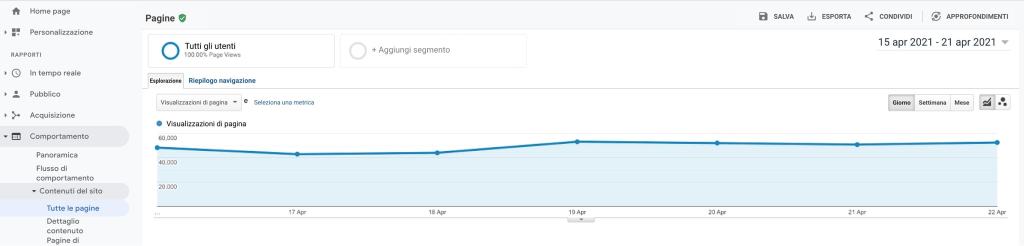
- Tutte le pagine: questa sezione mostra i dati di comportamento relativi a tutte le pagine del sito. Cliccando sull’icona “Confronto” che si trova in alto a destra e selezionando il filtro “Tempo medio sulla pagina”, possiamo capire quanto tempo gli/le utenti passano in media su una specifica pagina del sito. Se vediamo che una pagina ha particolare successo, nel senso che il tempo speso su di essa è particolarmente lungo, possiamo ricreare contenuti simili anche su altre pagine (es.: articoli del blog che trattano di argomenti simili).
- Pagine di uscita: sono le pagine che vengono visitate per ultimo prima che venga lasciato il sito. Per capire quali sono le pagine che più determinano l’abbandono del sito, clicchiamo ancora una volta sull’icona “Confronto” e poi selezioniamo il filtro “% Uscite”. Le pagina che funzionano meglio sono quelle con una percentuale inferiore. Se una pagina presenta una percentuale molto alta, allora sarà meglio concentrare l’attenzione su di essa per capire cosa spinge i visitatori/le visitatrici ad andare via. Bisogna ricordare che per alcune pagine è normale che la percentuale sia alta. Pensiamo ad esempio alla pagina di acquisto nel carrello: è del tutto naturale che gli/le acquirenti lascino il sito dopo aver comprato i prodotti o servizi di cui avevano bisogno.
Come accedere al report Comportamento?
1. Entra nel tuo account Google Analytics
2. In alto a sinistra seleziona dal menu la voce “Tutti i dati del sito web”
3. Nel menu laterale a sinistra, clicca sulla voce “Comportamento”
4. Clicca su “Contenuti del sito” per vedere i dati relativi a tutte le pagine, alle landing page e alle pagine di uscita
5. Per modificare il periodo di monitoraggio, vai in alto a destra e seleziona il periodo che ti interessa
6. Clicca su “Applica”
Monitora i progressi nel tempo
Ecco qui: quattro rapporti di base che puoi controllare su Google Analytics. Non ci sono limiti a quello che puoi fare con queste informazioni, e man mano che si acquisirai maggiore familiarità con lo strumento, potrai esplorare più possibilità. Per ora ti consiglio di tenere conto di queste informazioni e usarle per vedere quali pagine puoi migliorare, su quali fonti di traffico puoi concentrarti e come gli utenti stanno usando il tuo sito. Poi, man mano che fai dei miglioramenti, puoi seguire i tuoi progressi e vedere gli effetti nel tempo.
Hai un sito Jimdo, ma non sai come creare un profilo Google Analytics e come collegarlo al sito? Segui le indicazioni di questo articolo del nostro supporto online.
Se invece hai già collegato il profilo Google Analytics al tuo sito, vai nella tua dashboard Jimdo per controllare le statistiche. Spero che dopo aver letto questo articolo, saprai interpretarle senza difficoltà e prendere le decisioni più giuste per il successo del tuo sito.
Scegli Jimdo per creare il tuo sito di musica.
Costruisci la tua presenza online con Jimdo
Crea un sito web, vendi online e fai crescere la tua attività: tutto in un unico posto.

🚀 Pronto per lanciare il tuo business online?
Non serve carta di credito. Online in pochi minuti.